
If a genie granted you one wish for your website, what would it be?
(Besides asking for another 3 wishes, of course)
For me, it would be to show up , right on top in Google’s search results, for the right keywords.
Keywords that are related to my niche, that my intended visitors would be interested in.
To me, that’s what SEO means – help my customers find me!
Simple?
Optimizing your site for the search engine though, is anything but simple.
While no tool can fully take away the actual effort of identifying the right keywords and putting together the content for you, there are a whole bunch of SEO plugins for WordPress websites, that can assist you.
You still need to do all the thinking and planning yourself, don’t expect the SEO plugin to do that for you.
What should you look for while choosing a WordPress SEO plugin?
Here are some basic features you should expect from a good SEO plugin –
- Create a sitemap, while allowing you to include or exclude certain elements (pages, posts, categories etc.)
- Allow you to add meta titles, meta descriptions
- Recommend changes to meta data and content based on your focus keyword
- Evaluate readability and suggest changes
- Integrate with Google Analytics
So here’s a list of some of the most popular SEO plugins in WordPress, that include all of these essential SEO features.
RankMath free WP SEO plugin
Free
800,000+ active installations
Average 4.9 star rating across 2,922 reviews
I can’t help but start this list with RankMath, a free WordPress SEO plugin.
If you haven’t heard about it, it is high time you check it out.
When RankMath was launched in November 2018, Yoast’s SEO plugin already had a huge, well-established fan following with over 5 million active websites and a nearly 8-year head start. Despite that, RankMath has had a phenomenal rise in popularity within a relatively short time.
It is easy to see why.
Did you know you can migrate from Yoast to RankMath with a single click and import all your SEO settings?
Migrate from Yoast to RankMath
I installed RankMath on this website to check it out and take it for a spin (to help me write this review) and planned to uninstall it when done.
I had already installed Yoast on this website – with my meta descriptions, FAQ blocks etc. all set up within Yoast, so naturally, I was a little apprehensive about migrating to RankMath, another completely different SEO plugin.
However, the ease of set up in RankMath, with a clear step by step walk through of the options (which included a single-click option to migrate from Yoast to RankMath) was very impressive.
Now I plan to continue using RankMath.
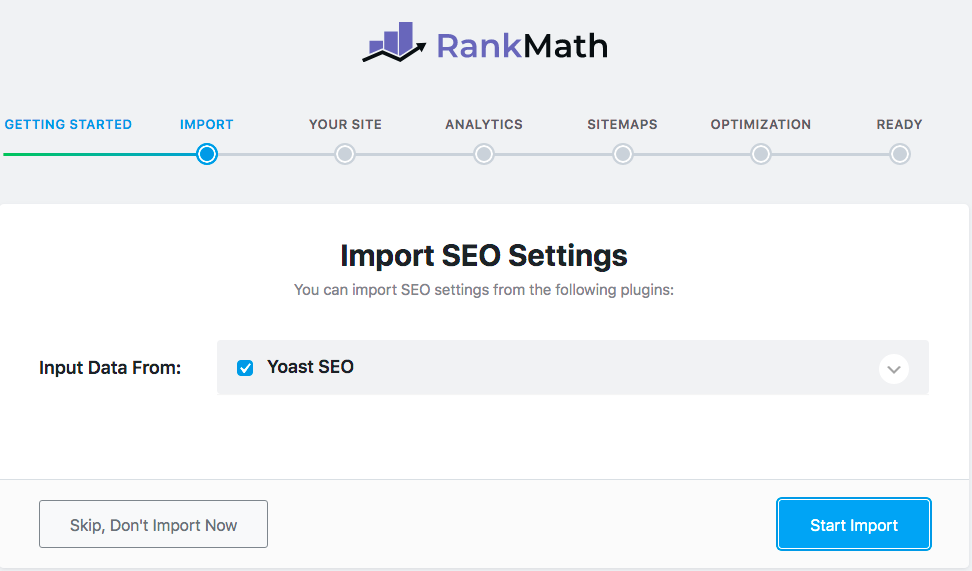
You can migrate all your Yoast plugin settings (meta descriptions, meta titles, FAQ blocks) to RankMath automatically using RankMath’s single click import feature.
Rank Math Analytics Dashboard
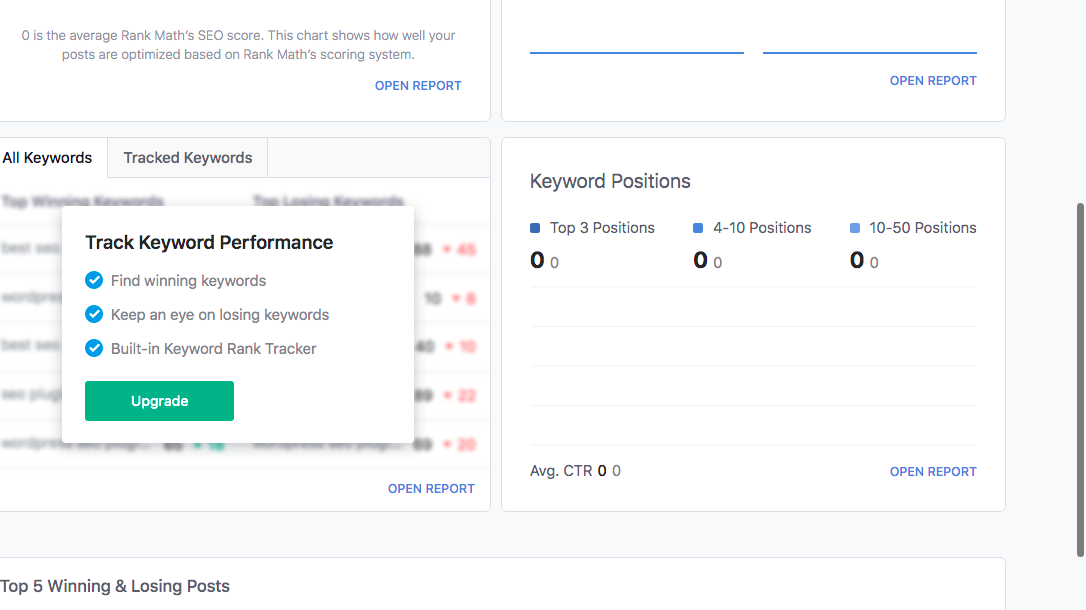
You can connect your RankMath installation to your Google Analytics and Google Search Console account, so that you can view all your analytics data in your WordPress Admin Dashboard. Some of the options related to keyword data, need you to upgrade RankMath from free to pro.
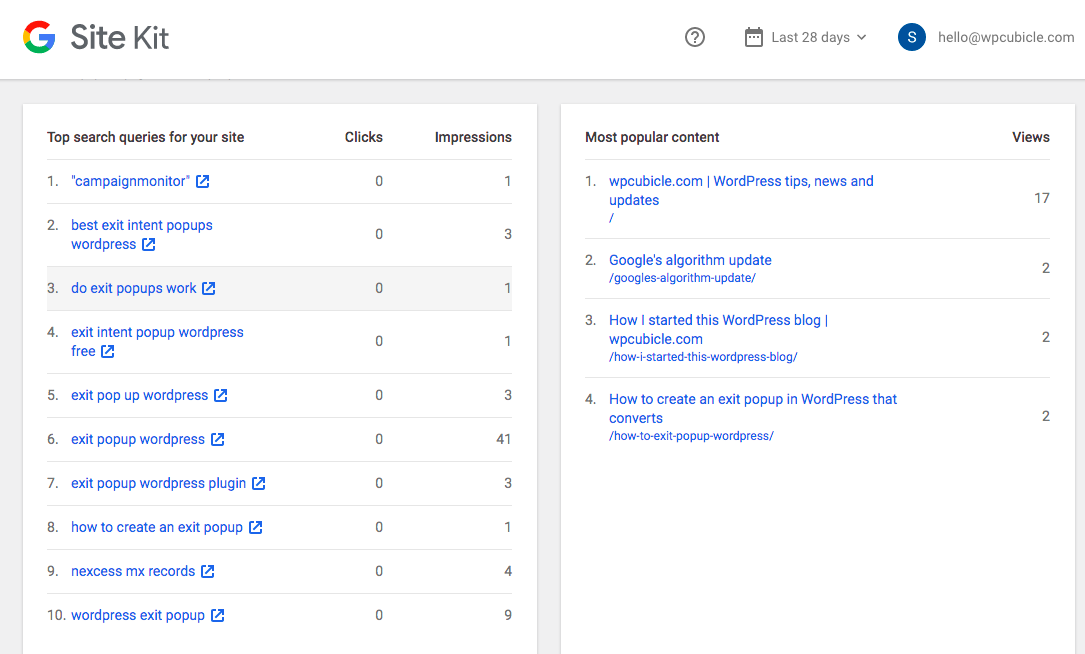
Site Kit by Google, shows you some of this data. But the Pro RankMath plugin aggregates the same data points and represents the data in a way that can help you make sense of it easily. You can slice and dice the data, via different dimensions to help you understand it.
RankMath Vs Yoast Vs All in One SEO
There are a bunch of WordPress plugins for SEO, but clearly the three most popular SEO plugins are
- Yoast (most active installations)
- All in One SEO (oldest)
- RankMath (youngest of these 3, but definitely the fastest growing)
| Features | RankMath | Yoast SEO | AIO SEO |
|---|---|---|---|
| Plans & Pricing | $59 a year (500 keywords tracking) $199 a year (10,000 keywords tracking) | Starts from $89 a year for one site with the price increasing based on the number of sites. Goes on up tp $6,675 for 150 sites. | $49 a year for 1 site, $299 for 100 sites |
| Free Version | Active installations:800,000+ Average rating of 4.9 star across 3,031 reviews https://wordpress.org/plugins/seo-by-rank-math/ | Active installations: 5 million+ Average rating of 4.8 star across 27,343 reviews https://wordpress.org/plugins/wordpress-seo/ | Active installations: 2 million+ Average rating of 4.5 star across 1,585 reviews https://wordpress.org/plugins/all-in-one-seo-pack/ |
| Keyword Rank Checker Track position history of the last 12 months | Pro | No | No |
| Nofollow All External Links You can choose to make individual links follow wherever needed | Free | No | No |
| Keyword Suggestions | Free – Google Suggestions & Google Trends | Free & Premium You can integrate it with your SEMRush Pro account | No |
| Internal Linking Suggestions | Free | Pro | No |
Frequently Asked Questions About Yoast
1. What is Yoast SEO?
Yoast SEO is a WordPress plugin that helps you handle many of the basic SEO tasks involved in running a website. It gives you tools for things such as SEO titles and meta descriptions, XML sitemaps, structured data, indexing settings, social sharing information, and content analysis.
One important thing to understand is that Yoast does not do SEO for you. It gives you tools and recommendations that make many SEO tasks easier to manage.
For example, when you write a blog post, Yoast can check whether you have used your chosen keyphrase in appropriate places and whether your content meets a number of basic SEO and readability checks.
In simple terms: Yoast is an SEO toolkit for WordPress, not a magic button that gets your site onto Google.
2. Is Yoast SEO free?
Yes. There is a free version of Yoast SEO for WordPress, and it includes many of the fundamental features that a blogger or small website needs.
The free plugin includes features such as SEO analysis, readability analysis, XML sitemaps, structured data, indexing controls and other technical SEO functionality.
There is also Yoast SEO Premium, which adds features such as internal linking suggestions, redirect management, AI-assisted optimization and additional support.
For someone starting a personal blog or small content website, I would not assume that Premium is necessary simply because it exists. Start with the free version and see whether you actually need the additional features.
3. Is Yoast SEO Premium worth it?
There is no universal answer here.
If you run a relatively small blog and are comfortable choosing your own keywords, writing your own titles and descriptions, and creating internal links yourself, the free version may be perfectly adequate.
Premium becomes more interesting when the site is larger or you want to save time on repetitive SEO tasks. Its additional features include internal linking suggestions, redirect management, AI-assisted optimization and premium support.
I would look at it this way:
Do you need the features, or do you simply feel that you should have the paid version because you are serious about SEO?
Those are two very different things.
4. How do I install Yoast SEO?
You can install the free version directly from your WordPress dashboard.
Go to:
Plugins → Add New Plugin
Search for Yoast SEO, install it and activate it.
Once activated, Yoast adds its own settings area to your WordPress dashboard. It also adds SEO-related settings to individual posts, pages and taxonomies.
After installation, Yoast recommends completing its first-time configuration. This is where you provide information such as your website name, whether the site represents a person or organization, and relevant social profiles.
You do not need to spend hours changing every available setting. Get the important basics configured and move on to actually running your website.
5. How do I set up Yoast SEO?
The easiest approach is to use Yoast’s first-time configuration rather than trying to figure out every setting yourself.
The configuration asks you for information about your website and helps establish the basic SEO settings. Yoast also uses this information when generating structured data about your site.
After that, review the important areas under Yoast SEO → Settings, particularly:
- Your website name and tagline
- Whether the site represents a person or organization
- Which content types should appear in search
- Your search appearance
- Social media information
- XML sitemap settings
One thing I would avoid is changing settings simply because they sound important.
If you do not know what a setting does, there is a good chance you do not need to change it.
6. Do I need to get a green Yoast score?
No.
This is probably one of the most important things a new WordPress user needs to understand about Yoast.
The green, orange and red indicators are there to give you guidance. They are not Google’s grading system.
Yoast’s SEO analysis checks a range of things, including keyphrase usage, links, image alt text and other content-related factors.
But getting a green score does not mean:
“Google will rank this article.”
And having an orange or red indicator does not mean your article is bad.
For example, you might deliberately choose not to repeat a keyphrase because doing so would make your writing sound unnatural. That can be the right decision.
Write for the reader first. Use Yoast as a guide, not as a report card.
7. Does Yoast SEO improve Google rankings?
It can help you implement good SEO practices, but it cannot guarantee better rankings.
This distinction is important.
Yoast can help you with technical and on-page SEO tasks. It can also flag things you may have overlooked while writing a post.
But it cannot make an unhelpful article useful.
It cannot make a topic less competitive.
It cannot give you first-hand experience.
And it cannot guarantee that Google will rank your page.
Think of Yoast as helping you prepare your website for search engines. What happens after that depends on many other factors, including the quality and relevance of your content, competition, links, site structure and Google’s own systems.
8. What is a focus keyphrase in Yoast?
A focus keyphrase is the main search phrase you want a particular page or post to be relevant for.
For example, if you have written an article about cleaning silver jewelry, your focus keyphrase might be:
“how to clean silver jewelry”
You enter that phrase into Yoast, and the plugin analyzes your content to see how you are using it. It can check things such as the title, URL, meta description and main content.
But there is an important distinction:
Yoast does not decide what your keyword should be.
That is part of keyword research.
You need to understand what your audience is searching for, what they actually want when they search for it, and whether the topic makes sense for your website. Yoast then helps you optimize the page around the phrase you have chosen.
9. Does Yoast create an XML sitemap?
Yes.
Yoast SEO automatically generates XML sitemaps for your website, and you can control which content types are included through its settings.
An XML sitemap essentially gives search engines a structured list of URLs on your website that you want them to discover.
For most websites, you do not need to manually create one.
Yoast normally creates a sitemap index at:
yourdomain.com/sitemap_index.xml
You can then submit the sitemap to Google Search Console if appropriate.
The important thing to remember is that having a sitemap does not guarantee that Google will index every URL in it. It helps Google discover your content; it does not force Google to rank or index it.
10. Does Yoast add Schema markup?
Yes.
Yoast automatically adds structured data, also known as Schema markup, to help search engines understand your website and its content. It creates a connected structured-data graph rather than simply adding isolated pieces of markup to individual pages.
For example, Yoast can provide structured information about:
- Your website
- Your organization or person
- Individual pages
- Blog posts
- Authors
- Other supported content types
The nice thing for beginners is that you do not need to know how to write Schema code to use this functionality.
One important caveat: Schema does not guarantee that Google will display a rich result. It makes your content eligible for certain search features and helps search engines understand it.
11. Can Yoast create redirects?
Yes, but this is a Premium feature.
Redirects are useful when a URL changes or a page is deleted and you want visitors and search engines to be sent somewhere else.
For example, suppose you change:
example.com/old-page/
to:
example.com/new-page/
A redirect can send visitors from the old URL to the new one instead of leaving them with a 404 error.
Yoast Premium includes a redirect manager that can handle several types of redirects, including redirects created when you change or delete URLs.
You do not need Yoast Premium specifically to create redirects, though. Other WordPress plugins and server-level solutions can do the same thing.
12. Can I use Yoast with Rank Math or another SEO plugin?
You generally should not run two full SEO plugins at the same time.
Yoast, Rank Math, All in One SEO and similar plugins overlap in many areas. They can all attempt to manage things such as:
- SEO titles
- Meta descriptions
- XML sitemaps
- Schema
- Canonical URLs
- Indexing settings
Running multiple SEO plugins can therefore create unnecessary duplication or conflicts.
If you are switching from another SEO plugin to Yoast, Yoast provides tools for importing settings from other SEO plugins.
The sensible approach is to choose one primary SEO plugin and use it consistently.
13. Does Yoast replace Google Search Console?
No.
Yoast and Google Search Console serve different purposes.
Yoast is a tool you use inside WordPress to help manage your site’s SEO.
Google Search Console gives you information about how Google is actually interacting with your website. It can show you things such as:
- Search queries
- Impressions
- Clicks
- Average search positions
- Indexing issues
- Search-related technical problems
Yoast can help you connect your site with Google Search Console and submit or manage your sitemap, but it does not replace Search Console.
If you are serious about growing a blog through Google, I would use both.
14. What is the difference between Yoast SEO Free and Premium?
The simplest way to think about it is:
Free gives you the core SEO tools. Premium gives you additional tools designed to save time and make SEO management easier.
The free version includes things such as:
- SEO analysis
- Readability analysis
- XML sitemaps
- Structured data
- Basic SEO settings
- Indexing controls
- Social metadata
Premium adds features including:
- Internal linking suggestions
- Redirect management
- AI-assisted optimization
- Additional SEO workflow tools
- Premium support
- Access to Yoast SEO Academy
For a beginner, the free version is a perfectly reasonable place to start.
The question is not “Which version has more features?”
Obviously, Premium does.
The better question is “Will I actually use those additional features?”
15. What happens if I stop paying for Yoast Premium?
This is another question worth answering because people sometimes assume that cancelling Premium means their entire SEO setup will suddenly disappear.
That is not how it works.
Yoast says that the plugin and its functionality remain available after a subscription ends, but you lose access to things such as ongoing updates, downloads and Premium support. Some functionality, including certain AI features, requires an active subscription.
So if you have been using Premium and decide not to renew, your website does not simply stop working overnight.
Frequently Asked Questions About RankMath
1. What is Rank Math?
Rank Math is an SEO plugin for WordPress that helps website owners manage both on-page and technical SEO. It provides tools for things such as SEO titles and descriptions, XML sitemaps, Schema markup, indexing controls, redirects, internal linking and SEO analysis.
It also includes integrations with services such as Google Search Console and Google Analytics, depending on the version and modules you use.
The important thing to remember is that Rank Math is a tool for implementing SEO, not a substitute for actually doing SEO. It can help you optimize a post, but it cannot decide whether the topic is worth writing about or whether your content is genuinely useful.
2. Is Rank Math free?
Yes. Rank Math has a free version that includes a substantial number of SEO features. Rank Math currently says its free version can be used on unlimited websites.
There are also paid versions, including Rank Math PRO, Business and Agency, which add features such as more advanced keyword tracking, additional Schema functionality, SEO reports and other tools.
For a new blogger, there is no reason to assume you need the paid version immediately.
Start with the free version. If you eventually find yourself needing a feature that is only available in a paid plan, then consider upgrading.
3. Is Rank Math better than Yoast SEO?
This is one of the questions you will see constantly, but there is no simple “Rank Math is better” or “Yoast is better” answer.
Both are established WordPress SEO plugins and both can handle the fundamental SEO requirements of a typical website.
Rank Math tends to appeal to people who want a lot of SEO functionality built into one plugin, including features such as multiple focus keywords, Schema tools, redirects and integrations. Its free version also offers a relatively broad feature set.
Yoast, on the other hand, has a long history in WordPress and is particularly well known for its straightforward content and readability analysis.
For a new website, I would not choose between them based on a feature comparison table alone.
Pick one, learn how to use it properly, and stick with it.
The difference between using Rank Math well and Yoast well is likely to matter far less than the quality of your content and your overall SEO strategy.
4. Do I need Rank Math if I already have Yoast SEO?
No.
You generally should not install Rank Math alongside Yoast SEO as two competing SEO plugins.
Both plugins can manage overlapping areas such as:
- SEO titles
- Meta descriptions
- XML sitemaps
- Schema
- Canonical URLs
- Indexing settings
Having both active can result in duplicated or conflicting SEO information.
If you want to move from Yoast to Rank Math, Rank Math has an import process designed to bring your SEO settings and data across from other SEO plugins. Its setup wizard specifically includes an Import step.
If you are happy with Yoast, there is usually no SEO reason to switch simply because you have heard that Rank Math has more features.
5. How do I set up Rank Math?
When you activate Rank Math, it takes you through a setup wizard rather than expecting you to configure everything manually.
The wizard covers important areas such as:
- Your website information
- Google services
- Sitemap settings
- SEO options
- 404 monitoring and redirects
- Schema markup
For a new website, I would go through the wizard carefully rather than accepting every setting without looking at it.
At the same time, do not fall into the trap of spending an entire afternoon configuring dozens of advanced options.
Get the fundamentals right first.
You can always revisit the settings later when you have a specific reason to change something.
6. Does Rank Math create an XML sitemap?
Yes.
Rank Math automatically creates XML sitemaps for your website and updates them as you add or change content. The sitemap index is normally available at:
yourdomain.com/sitemap_index.xml
You can submit this sitemap to Google Search Console.
If you have connected Rank Math with Google Search Console, Rank Math says it can also submit the sitemap index automatically.
One thing worth remembering: a sitemap does not guarantee indexing or rankings. Google describes a sitemap submission as a hint about which URLs you want it to know about; it does not guarantee that Google will crawl or index them.
7. Does Rank Math improve Google rankings?
Not by itself.
Rank Math can help you implement many SEO best practices. It can also identify certain issues with your pages and give you recommendations for improving them.
But installing Rank Math does not suddenly make a website rank higher.
For example, Rank Math cannot fix:
- Writing about the wrong topics
- Targeting keywords nobody is searching for
- Poor search intent
- Thin or unhelpful content
- Lack of authority
- Strong competition
- Poor user experience
This is something I would make very clear to beginners.
An SEO plugin can help you optimize a good page. It cannot turn a bad page into a good one.
8. Do I need to get a 100/100 SEO score in Rank Math?
No.
Rank Math’s SEO score is a checklist based on various optimization factors. It can be useful for catching things you may have overlooked, but it should not become your goal.
Getting 100/100 does not mean Google will rank your article above everyone else.
In fact, you can easily end up making your writing worse if you start changing perfectly natural sentences simply to satisfy an SEO score.
For example, if Rank Math suggests using your focus keyword a few more times, you do not need to force it into the article if the content already reads naturally.
I would treat the score as a quick audit, not a grade.
9. Can Rank Math create Schema markup?
Yes.
Rank Math includes Schema tools that allow you to add structured data to your content. The plugin supports multiple Schema types, with additional Schema functionality available in its paid versions.
For a beginner, the useful part is that you do not necessarily have to write Schema markup manually.
For example, if you publish an article, you can tell Rank Math what type of content it is and provide the relevant information.
However, there is an important distinction:
Adding Schema does not guarantee a rich result in Google.
It helps search engines understand your content and can make a page eligible for certain search features, but Google ultimately decides what appears in its search results.
10. Can Rank Math create redirects?
Yes.
Rank Math includes a redirection module that allows you to create and manage redirects within WordPress.
This is particularly useful when you change a URL.
For example, imagine you originally published:
yourwebsite.com/best-wordpress-plugins/
and later changed it to:
yourwebsite.com/wordpress-plugins-for-bloggers/
You do not want visitors who have the old URL bookmarked—or links from other websites pointing to the old URL—to simply hit a 404 page.
You can create a redirect from the old URL to the new one.
This is one of those features that you may not need every day, but you will be very glad to have when you start restructuring an established website.
Final Thoughts
There is a tendency with SEO plugins to become obsessed with the plugin itself.
You start by installing Rank Math.
Then you start checking your SEO score.
Then you discover Schema.
Then redirects.
Then keyword tracking.
Then you are suddenly spending more time configuring your SEO plugin than actually creating content.
That is backwards.
Use Rank Math to make SEO easier, not to make SEO feel like a full-time job.
Get the important settings right, use its recommendations where they genuinely help, and then get back to the things that actually grow your website: choosing good topics, understanding your audience and publishing useful content.
RankMath’s ease of use, it’s features and it’s support are absolutely stellar. This website now uses the free version of RankMath and I haven’t felt the need to upgrade to the Premium yet.
RankMath helps you to make sure your content is aligned with your focus keyword (or the other way round), even checking the alt text for your images to make sure the focus keyword is used.
P.S. This is not a paid or sponsored review for RankMath. This post does contain affiliate links though that earn us a commission should you purchase using these links (at no additional cost to you).