
WPForms is a popular plugin that is used to create forms on a WordPress website – but is it the best one out there? Let’s start with what it takes to be a good forms plugin.
Choosing a good forms plugin for WordPress
When it comes to creating an online form, here are the features you might need-
- Verification – Verify visitors age
- Conditional logic – Hide or show certain input areas based on the earlier answers
- Spam Prevention – Prevent spammers or bots from submitting forms using captcha or any other anti-spam technique
- Lead Generation – Add submitted details to an email list automatically
- Payment Integration – Accept payments and set up subscriptions
- Save Progress – Allow users to save forms and continue later
WPforms has all of these features, making it one of the best WordPress forms plugin out there.
About WPForms
WPForms was created and launched in 2016 by Syed Balkhi and Jared Atchison. It is managed by Awesome Motive – the same team that has popular WordPress plugins like OptinMonster, WP Mail SMTP plugin and more in its portfolio.
WPForms – a multi-purpose forms plugin
WPForms is an easy-to-use but versatile WordPress plugin, that you can use to create forms of all kinds.
Listed below are just some of the ways to use this Swiss knife of WordPress forms-
Contact Form WordPress plugin
Here’s how you can create a contact form using WPForms
Step 1. Install WPForms Lite
Navigate to your Admin Dashboard via WordPress Login and install WPForms, the free version available on WordPress.org

Step 2. Activate the plugin
After you activate the plugin, here’s the first screen that shows up. As you can tell, there is so much help available that even novices should be able to create a contact form easily.

Step 3. Create a contact form
Click on ‘Create your first form’, select the template ‘Simple Contact Form’ and click on ‘Use Template’.
It is easiest to start with this template and then add, edit or delete the form elements as needed. However, you could also choose to start with a ‘Blank Form’ and design your own form from scratch.

Step 4. Edit the form
Modify the form as you please and click on ‘Preview’ to see how it looks.
Step 5. Add the form to a page
Click on ‘Embed’ to use the form in a post or page

WordPress Survey Plugin
If you are looking for a good WordPress survey plugin, WPForms is perfect. It has several ready-to-use, well-designed templates for survey forms, all of which are available in its premium version.

List of Survey Form Templates
- How Did You Hear About Us Survey Form
- Employee Engagement Survey Form
- Customer Satisfaction Survey Form
- Simple Candidate Interview Form
- Multi-Step Office Survey Form
- New Hire Orientation Survey Form
- Class Survey Form
- Restaurant Review Form
- Anonymous Employee Satisfaction Survey Form
- Customer Feedback Survey Form
- Cancellation Survey Form
- Neighborhood Events Survey Form
Registration WordPress Plugin
WPForms can be used to create registration forms for all scenarios.
WPForms Lite – Ready-to-use Registration Form Templates
- Constant Contact Newsletter Signup Form
- Conference Registration Form
- Meeting Room Registration Form
WPForms Premium – Ready-to-use Registration Form Templates
- Hotel Reservation Form
- Notary Form
- ActiveCampaign Newsletter Signup
- GetResponse Newsletter Signup Form
- AWeber Newsletter Signup Form
- Drip Newsletter Signup Form
- Mailchimp Newsletter Signup Form
- Talent Show Auditions Sign Up
- Child Care Registration Form
- Daycare Registration Form
- Preschool Registration Form
- Contest Registration Form
- Adult Camping Registration Form
- Nursery Registration Form
- GP Surgery Registration Form
- High School Reunion Registration Form
- Gym Registration Form
- Gaming Tournament Registration Form
- Fundraiser Registration Form
- Workshop Registration Form
- Webinar Registration Form
- Football League Registration Form
- Family Reunion Registration Form
- Enrollment Form
- Employee Information Form
- Vendor Registration Form
- College Application Form
- Summer Camp Registration Form
- Ski Lodge Registration Form
- School ID Registration Form
- Retreat Registration Form
- Online Event Registration Form
- Online Race Registration Form
- Camp Registration Form
- Baseball League Registration Form
- Auction Item Registration Form
More WordPress Form Templates
WPForms has over 400 professionally designed templates for all kinds of forms.

Pricing
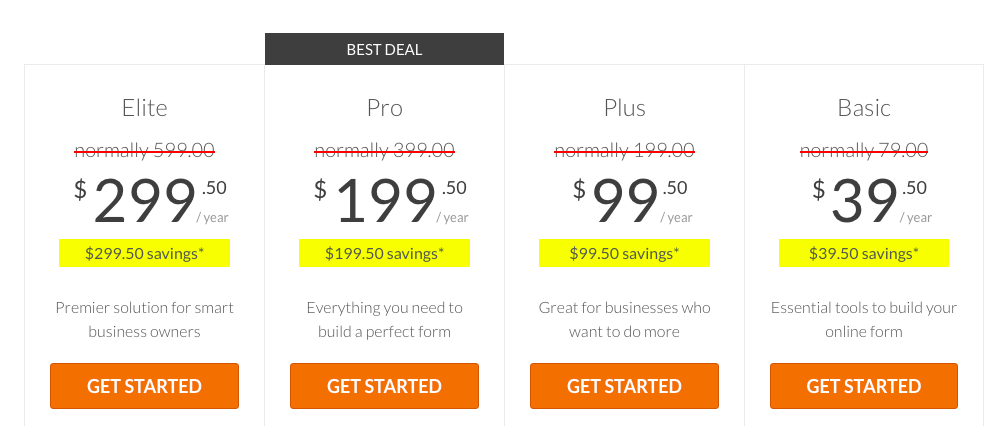
There are 4 different plans starting from $39.50 / year for 1 site going up to to $299.50 / year for usage on unlimited sites.
There’s a 14-day Money Back Guarantee that you can take advantage of, if you realize this is not what you expected.
How to fix – WPforms not sending email issue
Here’s a list of tutorials to help you fix this common issue (that’s also easy to solve) –
Fixing Contact Form Not Sending Email
Troubleshooting Form Notification Emails
In Conclusion
WPForms is a well-designed forms plugin with almost every feature you would need in a forms plugin for WordPress.
What I loved the most is how user-friendly it is – right from the wizard-like walk-through, the 5-minute form challenge, the detailed documentation to the helpful video tutorials.